Showing posts with label d) Research. Show all posts

Friday, October 27, 2006

Research- Human Factors in Speech

Human factors in speech

?>?>?>?>
For many years a group of human factors specialists have studied the implications of speech technology on human computer interaction.


In addition to physiological aspects of human factors, there are the cognitive and psychological aspects of human interacting with speech technology in computers .for example what constraints must users observe in their speech so that a speech recognizer can understand them?

Does constraining their speech make them more or less effective? Does it change the way they work? How do people react to synthesized speech? Do they mind if the computer sounds like a computer? Do they prefer that it sound like a human? How does computer speech affect task performance? Now add this to the aspect of Multi-Modality. Some speech technology involves speech only, but a significant portion of the interfaces being designed with speech are multi-modal. They involve not just speech, but other modes such as tactile or visual. For example a desktop dictation system involves speaking to the computer and possibly using the mouse and keyboard to make corrections. Speech added to a personal digital assistant handheld device means that people will be speaking while looking at a small screen while pushing buttons. Research is looking at when people use which modes and how they use them together.


Here, then are some of the human factors issues surrounding speech technology.


High error rates


Neural network technology dramatically improves speech recognition systems and allows speech recognizers to hear human speech even better than humans do, especially when competing with background noise.

Much work has to be done to help humans to detect errors and to devise and carry out error strategies. Imagine if every tenth key press you made on your keyboard resulted in the wrong letter appearing on the screen. This would affect your typing and your performance significantly. That describes the state of errors with speech recognition for many systems.

Unpredictable errors


Besides relatively high error rates, the errors that speech systems make are not necessarily logical or predictable from the human’s point of view. Although some are more understandable- such as hearing ?>?>?>?>Austin when the user says Boston-others seem illogical.

When we speak to a computer we don to appreciate the effect that such qualities as intonation, pitch, volume, and background noise can have. We think we have spoken clearly but we may actually be sending and ambiguous signal. The computer may understand a phrase one time and misunderstand the same phrase another time. Users do not like using un-predictable systems lower interims of acceptance and satisfaction of speech technology

People’s expectations

Humans have high expectations of computers and speech. When they are told that a computer has speech technology built in they often expect that they will have a natural conversation with it. They expect the computer to understand them and they expect to understand the computer. If this human-like conversational expectation is not met (and it is often not met), then they grow frustrated and unwilling to talk to the computer on its realistic terms.

However if humans are given realistic expectations of what the computer can and cant understand .then the are comfortable constraining their speech to certain phrases and commands. This does not seem to impede performance on task. Using constrained speech is not a natural way for people talk to pother people or even a natural way for people to talk to computers .nevertheless, within short time users can learn and adapt well to constrained speech.

Users prefer constrained speech that works to conversational speech those results in errors.

Working multi-modally

Many tasks lend themselves to multi modality for example a traveler may point to two locations on a map saying “how far?”... People will use one modality such as speech alone followed by other another modality such as pointing with a mouse or pen. In other words they will switch between modes. Sometimes they use two or more modes simultaneously or nearly so for example pointing first and then talking.

Speech only systems tax memory

Because a speech only system lacks visual feedback or confirmation, it is taxing on human memory. Long menus in telephony applications for instance are hard to remember

Spoken language is different

People speak differently than they write, and they expect systems that speak to them to use different terminology than what they may read. For example, people can understand terms such as delete or cancel when viewing them as button labels on a GUI screen but they expect to hear a less formal language when they listen to a computer speak

Users are not aware of their speech habits. Many characteristics of human speech are difficult for computers to understand, for example using “ums” or “uhs” in sentences or talking too fast or too softly .Many of these characteristics are unconscious habits.


People Model Speech

Luckily people will easily model another’s speech without realizing it. We can constrain or affect the user’s speech by having the computer speak the way you want the user to speak. People tend to imitate what they hear!


This is taken from the book "Designing Effective Speech Interfaces" by Susan Weinschenk and Dean T Barker

Research- Types of interfaces

As usability engineers we are interested in how to make technology easy to learn and use

We are concerned with how to design products so that people can be productive as possible with the product, as quickly as possible. Designing to optimize usability means paying specific attention to how the interface looks and acts

This includes

¨ Ensuring that the interface matches the way people need or want to accomplish a task

¨ Using the appropriate modality for example visual or voice at appropriate time

¨ Spending adequate design time on the interface

What are the types of interfaces?

There are several types of interfaces.in the past and still around to some extent were character based user interfaces then graphical user interfaces became prevlent and next came web user interfaces WUI and then speech user interfaces

What is speech interface?

It would be simple to answer but it is not

Because it is a relatively new idea to have our technology involve speech. This is a field that is just starting to grow. Like any new field, the definitions and terminologies are not standard

Speech interfaces

The term speech interface describes a software interface that employs wither human speech or simulated human speech. You can further break down interfaces into auditory user interfaces and graphical user interfaces with speech.

Auditory user interfaces AUI

An auditory user interface is an interface which relies primarily or exclusively on audio for interaction including speech and sounds. This means that commands issued by the machine or computer as well as all commands issued by the human to control the machine or computer are executed primarily with speech and sounds. Although AUI may include a hardware component such as a key pad or buttons visual displays are not used for critical information

Examples are

¨ Medical transcription software that allows doctors to dictate medical notes while making rounds

¨ Automobile hands free systems that allow drivers to access travel information and directions

¨ Interactive voice response systems in which users access information by speaking commands such as menu numbers to listen to information of their choice

¨ Products for the visually impaired that rely only on audio text and cues

Graphical user interfaces with speech

AUI where the user interacts with the software primarily via speech.we call these multi-modal interfaces ie graphical user interfaces with speech or S/GUI for speech/GUI

¨ A word processor that allows users to dictate text instead of or in addition to typing it in

¨ Web navigation software that allows users to navigate to and within websites by using voice

¨ Talking dictionaries that speak definitions

In these S/GUI applications, tasks can

¨ Be completed using speech only where users issue a speech command or listen to the software speak to the software speak to them

¨ Rely on visual or manual gui aspects for example viewing a graphic or clicking a hyperlink

¨ Require or at least allow a combination of both a GUI

Non-speech audio

Some interface elements include audio but not speech these interface elements include music and sounds.some non speech audio is included in almost all interfaces of any type including S/GUI , AUI,and GUIs .examples of non speech audio include

¨ The computer beeps when the user makes an error

¨ The user clicks on a map and hears a low tone to indicate that the water to be foudna t that site is deep in the ground or a high tone to indicate that the water is closer to the surface

This is taken from the book "Designing Effective Speech Interfaces" by Susan Weinschenk and Dean T Barker
Tuesday, October 17, 2006

Research - City Space

A part of the paper about the movie "City Space" which was t a candid documentary exposing the conflicts and contradictions surrounding graffiti in Vancouver

Director: Craig Noble

It is tried to uncover a world where the line between art and vandalism is blurred.creative expression and social responsiblity meet head on in an articulate collage of fact and opinion as subculture and bureaucracy collide.

the paper is worth reading, it changes one's perspective towards art and vandalism..


Saturday, October 14, 2006

Research-Collaborative art

Common Weal Community Arts engages communities and professional artists to come together and create art.

It's all about finding social empowerment through the spirit of collaboration. The process of working together helps the participants build bridges to each other, and leads to the creation of high-calibre art.

Common Weal inspires ideas for social change through art. By linking professional artists with communities to engage in collaborative art projects, we empower people - and their communities - to tell their stories in their own voices.


Research- WIFI Graffiti ( Wiffiti )
http://www.wiffiti.com/txtoutloud/


A new technology called Wiffiti is,enabling people to send text messages to large flat panel displays in social venues such as cafes, bars and clubs. Wiffiti is grounded upon the premise that sending messages to a public screen rather than a private phone will resonate with both the location and its community.


Messages sent to Wiffiti screens are also visible on this web site, encouraging people to watch “the word on the street” as it unfolds. Click on the viewer tab, pick a screen, and send a txt from anywhere. Then, sit back and watch responses appear from across the country! Better yet, head over to the closest Wiffiti location to txt out loud!

The first Wiffiti screen was installed in January 2006 at Someday Café in Boston, MA, a city that now has three other Wiffiti screens. Screens are now spreading rapidly, appearing in Chicago, Denver, Seattle, Knoxville, Boulder and New York.

I tried getting a password and also tried to log in, but it does not work for international audience.

Thursday, October 12, 2006

Research- Graffiti

History of Graffiti

The word "graffiti" derives from the Greek word graphein meaning: to write. This evolved into the Latin word graffito. Graffiti is the plural form of graffito. Simply put, graffiti is a drawing, scribbling or writing on a flat surface. Today, we equate graffiti with the "New York" or "Hip Hop" style which emerged from New York City in the 1970's.


Graffiti Culture

Graffiti quickly became a social scene. Friends often form crews of vandals. One early crew wrote TAG as their crew name, an acronym for Tuff Artists Group. Tag has since come to mean both graffiti writing, 'tagging' and graffiti, a 'tag'. Crews often tag together, writing both the crew tag and their own personal tags. Graffiti has its own language with terms such as: piece, toy, wild-style, and racking.


Graffiti Tools

At first pens and markers were used, but these were limited as to what types of surfaces they worked on so very quickly everyone was using spray paint. Spray paint could mark all types of surfaces and was quick and easy to use. The spray nozzles on the spray cans proved inadequate to create the more colorful pieces. Caps from deodorant, insecticide, WD-40 and other aerosol cans were substituted to allow for a finer or thicker stream of paint. As municipalities began passing graffiti ordinances outlawing graffiti implements, clever ways of disguising paint implements were devised. Shoe polish, deodorant roll-ons and other seemingly innocent containers are emptied and filled with paint. Markers, art pens and grease pens obtained from art supply stores are also used. In fact nearly any object which can leave a mark on most surfaces are used by taggers, though the spray can is the medium of choice for most taggers.


Graffiti in the 21st Century

As graffiti has grown, so too has its character. What began as an urban lower-income protest, nationally, graffiti now spans all racial and economic groups. While many inner-city kids are still heavily involved in the graffiti culture, one tagger recently caught in Philadelphia was a 27 year old stockbroker who drove to tagging sites in his BMW. Styles have dramatically evolved from the simple cursory style, which is still the most prevalent, to intricate interlocking letter graphic designs with multiple colors called pieces (from masterpieces).


Graffiti Style Art

While most taggers are simply interested in seeing their name in as many places as possible and as visibly as possible, some taggers are more contented to find secluded warehouse walls where they can practice their pieces. Some of these taggers are able to sell twelve foot canvases of their work for upwards of 10 - 12 thousand dollars.


Commercialization, the Web and the World

Graffiti shops, both retail and on-line, sell a wide variety of items to taggers. Caps, markers, magazines, T-shirts, backpacks, shorts with hidden pockets, even drawing books with templates of different railroad cars can be purchased. Over 25,000 graffiti sites exist on the world wide web, the majority of these are pro-graffiti. Graffiti vandalism is a problem in nearly every urban area in the world. Pro-graffiti web sites post photos of graffiti from Europe, South America, the Philippines, Australia, South Africa, China and Japan. Billions of dollars worldwide are spent each year in an effort to curb graffiti

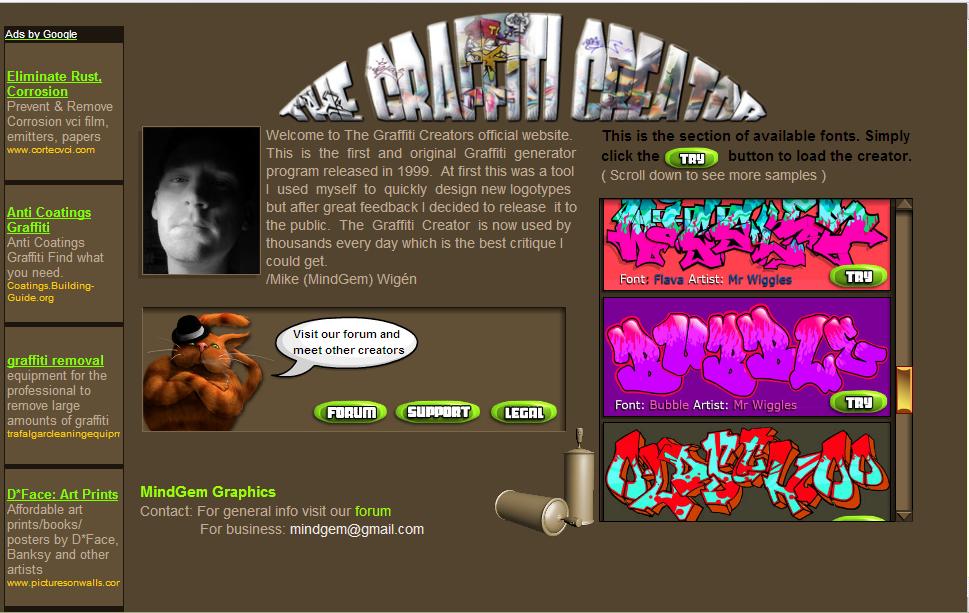
one such site i found was,a graffiti creator http://www.graffiticreator.net/ where you can (online) create text images like graffiti


tried writing my name:

Wednesday, October 11, 2006

Research-Digital Sound Modelling

Parameters of Sound Perception
Human sound perception varies, probably even more than human vision. Basic sound modelling techniques need to work well for a large proportion of people with "normal" hearing. Here are typical parameters of human hearing, based on my interpretation of information in Audition, by Pierre Buser and Michel Imbert, English translation by R. H. Kay, MIT Press, Cambridge MA, 1992, and in the notes to the CD Audio Demonstrations, by A. J. M. Houtsma, T. D. Rossing, W. M. Wagenaars, Philips 1126-061.

Frequency range:
20 Hz to 20,000 Hz. Musically, that is a spread of about 10 octaves (the piano has about 7 octaves). Some people hear signals with frequencies well above 20,000 Hz. In a changing sound, frequency components far above 20,000 Hz may have perceptible effects, even though they are not noticeable as components of the sound.

Frequency discrimination:
Between about 1,000 Hz and 8,000 Hz, we notice changes between frequencies whose ratios are about 1.002 or 1.003, which is roughly 200 to 350 steps per octave, or something between 1/30 and 1/15 of a musical half step. Outside of this range, discrimination is poorer, but for most of the range of audible frequencies we notice changes in ratios smaller than 1.01, which gives more than 60 steps per octave, or something smaller than 1/5 of a half step. Discrimination of frequencies played in sequence is bit less---typically about 90 steps per octave or about 1/8 of a half step.

Musicians interested in nonstandard pitches have usually used the cent, which is 1/100 of a half step, or the savart, which is 1/25 of a half step. In complex sounds, frequency distinctions may be important even though they are less than those preceptible as changes in a simple helical signal. There is also a unit, called the mel that is like a pitch measurement, but scaled to the people's judgments that certain pitches are ``twice as high'' as others in psychological experiments. Although it is defined in terms of perceptual parameters, the mel probably does not correspond as well to perception as the various musical measures.
Taking frequency resolution between 90 and 360 steps per octave, over a range of 10 octaves, we get 900 to 3,600 distinguishable frequencies. But, it seems that we cannot exploit those as independent bits, and the practical information capacity of a single sound is much less.

Critical bands:
Our hearing is affected by "critical bands" of frequencies. The width of these bands is about 1/3 octave, but it varies according to the center frequency. The bands are not discrete, rather there is a critical band at each center frequency. Frequency discrimination for signals of only one wavelength is approximately the width of a critical band. A sound is perceived louder if its energy is spread across many critical bands, rather than concentrated in a few. I think that critical bands represent the basic frequency resolution of the filters in the cochlea. Greater frequency discrimination presumably comes from further filtering in the nervous system. So, about 30 critical bands cover the 10 octaves of human frequency perception, yielding 30 disjoint bands. But, it is not at all clear to me that a single mix of frequencies can present even 30 bits to our brains in a usable way.
Beat frequencies:

When two helical signals are played simultaneously with frequencies differing by 2-3 Hz, we hear a single intermediate frequency, getting louder and softer. This phenomenon is called "beats." The rate of the beats is is the difference between the helical frequencies. Beats may be heard with frequency differences as high as 35 Hz, but the boundary is extremely fuzzy.

Event resolution:
I haven't found data on this point yet. I am pretty confident that I can distinguish clicks separated by 1/30 second, and I believe that I can go close to 1/100 second. Event resolution depends crucially on the frequency components of the events. The start of a helical signal at frequency F cannot be perceived more precisely than about 1/F.

Transient scale:
Again, no data yet. I think that transients occur on a scale of 1/1000s to 1/100s of a second.

Measuring loudness:
I found the complications of different ways of measuring loudness quite confusing, and haven't succeeded in reducing them to a brief description. Loudness can be related either to power level, typically measured in Watts per square meter (W/m^2), or to change in pressure, typically measured in bars, where 1 bar is the normal pressure of the atmosphere. In either case logarithmic units called decibels (dB) are used, where a difference of 10 dB represents multiplying the power by 10, a difference of 20 dB represents multiplying the pressure by 10 (power is proportional to the square of pressure). You will find different choices for the 0 of the decibel scale. A typical choice is that 0 dB is about 2/10^10 bars, or 1/10^12 Watts per square meter. On this scale, typical loudness measures include
• 10 dB rustling leaves
• 20 dB noise in a recording studio
• 30 dB noise in a quiet room
• 30-70 dB conversational speech
• 40 dB noise on a quiet street
• 50 dB quiet music
• 60 dB cocktail party conversation
• 70-80 dB noisy street
• 90 dB symphony orchestra, playing loud
• 100 dB jackhammer at 2 meters
• 120 dB thunder, or jet engine at 10 meters

There is a special unit of loudness, called the sone, that is scaled to our auditory sensitivity at different frequencies. In principle, this is a good idea, but the extra complication is probably not worth it for most of our purposes.

Loudness range:
From about 500 Hz to 2000 Hz we detect sounds as quiet as 5 dB, which is about 4/10^10 bar pressure change, or 3/10^12 Watts per square meter. At lower frequencies, sensitivity reduces, and we need about 75 dB to hear a sound at 20 Hz. At higher frequencies the curve is more complicated, improving to about -4 dB at 4000 Hz, then varying up to about 25 dB at 12000 Hz. There is no fixed upper limit to detectible sound. Around 100 dB (2/10^5 bar, 1/10^2 Watts per square meter) sound gets to be uncomfortably loud. Around 140 dB (2/10^2 bar, 10^2 Watts per square meter) it becomes physically painful. Eventually, I suppose it becomes lethal. The power ratio between the softest detectable sound and the loudest usable sound is something like 10^4 to 10^10, a range of 40-100 dB.

Loudness discrimination:
Minimum noticeable changes in loudness vary from about 0.15 dB to about 10 dB, depending on the type of signal. 3/4 dB to 1 dB is probably a practical increment. Loudness is a tricky parameter for carrying information, since our perception of it is very sensitive to context, and we have poor memory for loudness levels. 3/4 to 1 dB discrimination, over a 60 dB range, suggests 45-60 discriminable loudness levels. Since a given sound has only one loudness, this suggests that loudness can only carry log 45 to log 60 (base 2), that is 5 or 6 bits of information. That is probably more than can be used practically. It's not at all clear how well relative loudness of different components of a sound can be distinguished. In strictly monaural sound, we probably shouldn't expect to distinguish more than one loudness value per critical band, or 30 in all, with a total capacity of 150-180 bits. But, the threshhold of pain is probably determined more by the total loudness than by the maximum loudness per critical band, and other perceptual complications probably restrict the total information capacity of the loudness channel to something much smaller.

Sunday, October 08, 2006

Research -Sound Experiments

The Dancing Flames

Visualising the sound waves through the flames.. interesting


Normal media players like winamp and windows media player also have visualizations which are generated by studying sound,
I think this one is a similar experiment
Visualization experiment


Resonance Effect

How sound frequencies and their resonating effect can generate patterns


Messa di Voce:

Strange sound interactions.. visualizations as well.

This is an installation in public space..
See for yourself..

Saturday, October 07, 2006

Research -Voice Recognition and Control

Speech Recognition controlling Flash

Thought that it was some speech recognition integrated with flash.Actually I am thinking to do it this way.. planning for a collaborative social way of interacting with a medium through voice and sound based inputs..
but this turned out to be how speech recognition can used in flash to invoke commands.Sad..


Voice control

This shows how a robot is controlled based on voice inputs.

Friday, October 06, 2006

Research & Thought Process -Voice recogntion

Voice Recognition Animal Interaction

I found this very interesting sound based interaction on YOUTUBE .It was one of my concepts, of gaming with voice based signals, here through speech recognition , different events are triggered and interactions happen.
Its interesting to watch and I think should be even more interesting to play with.

This is voice based inputs for a game.

What I am thinking is a simpler version where a user through sound inputs can trigger something, a simple game like Mario for example, where the basic action is to jump (if we keep the moving forward as constant)..

those single click games..

simple thing like to keep running to win the race..

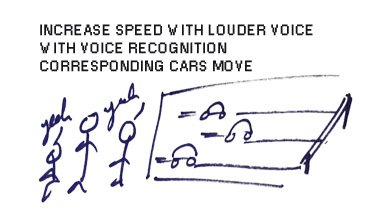
I also have thought about a scenario where a group of people can play a racing game, the screen shows a corresponding car, and the speech recongnition system recongnizes each sound input and accordingly triggers the cars to move forward.. the louder you shout, or the more consistantly you shout, the more will be your speed.And hence a game can be played collaboratively.

God Help Their Neighbours!!

Wednesday, October 04, 2006

Research- voice recognition in machines

Blendie: a voice controlled blender


Just watch this video, its amazing, it shows how with the change in the loudness of sound , the speed of the blender increases... its also very funny... and scary also , because this blender is supposed to have a mood of its own and it suddenly starts on its own sometimes!

Tuesday, October 03, 2006

Research - Windows did it again!

Speech recognition in Windows Vista

Found this interesting video of how Windows Vista recognizes speech inputs and executes commands.. though its kinda funny how he says "double click 'folder_name' " but its nice to see it work.I liked the way he marks the points in MSPAINT..

This speech recognition feature was first introduced with microsoft office XP, and now it is encapsulated with the operating system!

Saturday, September 02, 2006

Research -Interactive Mirrors

Interactive Mirrors.. here they are..
Interestingly done, almost an immersive environment.. check the link http://www.interactivemirror.net/
here is some of the matter from there.

They also have a video on the website, which can be checked.


The objective was to create a unique and fascinating interactive experience, engaging consumers at larger-than-life size and immersing them in the presentation. The interactive mirror shares the brand’s philosophy of using design to create a more emotionally rich experience and demonstrates how design is manifest in Infiniti vehicles.

The installation consists of three 8’ high by 3.5 ’ wide panes of mirrored glass placed side by side, each displaying rear-projected content from a high-lumen projector. A user standing in front of the mirrors has the unusual sensation of seeing their reflection and the projected content simultaneously.

Sensors embedded in the structure above each pane register when a user reaches out to a “hot spot,” allowing users to navigate the projected content without ever needing to touch the “screen” or press a “button.” This combined with scale of the system, and the projected image being captured on the inside surface of the glass creates a unique spatial experience where the content appears organically before the viewer. An additional sensor recognizes when a user approaches and automatically activates the mirror to welcome the visitor.

To take advantage of the spatial experience, content was designed in three dimensions, using scale, motion and depth perspective to make the user feel like she is immersed in and moving through the communication, not merely viewing it. Integrating full motion video, Flash animation, motion graphics, still photography, dynamic type and responsive sound, the content enables users to explore the guiding vision of the brand. This includes a broad sampling of ways this vision has transformed how Infiniti vehicles look, feel and move, as well as how each Infiniti model is an expression of the brand promise.

Creation of the Infiniti Interactive Mirrors and their content was a collaborative effort. The George P. Johnson Company along with Nikolai Cornell of madein.la developed the exhibit and the technology concept. Phil van Allen of Commotion New Media designed, developed and integrated the sensor system. The Designory directed, designed and wrote the content. And Mindflood was responsible for motion graphics design as well as video integration and user-interface programming for the Flash platform.

Friday, September 01, 2006

Research -Wooden Mirror

Wooden Interactive mirrors..


A very clever mechanical wooden mirror.

"The 4 mechanical mirrors are made of various materials but share the same behavior and interaction; any person standing in front of one of these pieces is instantly reflected on its surface. The mechanical mirrors all have video cameras, motors and computers on board and produce a soothing sound as the viewer interacts with them. "